Searching for Clienage9 for PC can leave you with an important question: Is it a downloadable Windows application, an online gaming platform, or simply a website you can access through your browser?
Clienage9 for PC is a search term associated with a gaming-related online platform and claims about desktop software. However, publicly available information does not independently confirm an official Windows application or verified installer. Before downloading anything, check the developer, official distribution source, software documentation, and digital signature.
The distinction matters because different websites describe Clienage9 in different ways. Some discuss gaming strategies and performance tools, while others provide installation instructions for a supposed Windows application.
At present, there is not enough independently verified information to establish an official standalone Windows release. This guide explains what is publicly known, how to access the available online content, and how to avoid potentially unsafe downloads.
What Is Clienage9?

Clienage9 is a name associated with online gaming-related content. Its website and third-party articles discuss topics such as gaming strategies, competitive analysis, performance optimization, and gameplay improvement.
However, these descriptions should not automatically be interpreted as proof that Clienage9 is a downloadable PC program.
There is an important difference between a website that publishes gaming information and a software application that installs directly onto Windows.
Before treating Clienage9 as a specific game or application, users should establish which product or platform they are actually looking for.
Is Clienage9 Available for PC?
There is currently no independently verified evidence establishing a widely distributed official Windows application under the Clienage9 name.
Some third-party websites claim that users can download an installer and follow a Windows installation process. However, the availability of installation instructions does not prove that the software is authentic or officially supported.
This distinction is particularly important if you find an executable file claiming to be the official Clienage9 installer.
Before downloading, look for:
-
An identifiable software developer.
-
An official product announcement.
-
A trustworthy download source.
-
A documented software version.
-
Verified Windows compatibility information.
-
A valid digital signature, where applicable.
If these details are missing, avoid installing the file until its origin can be confirmed.
How to Access Clienage9 on a PC
You do not necessarily need a dedicated Windows application to explore an online platform.
If you want to access Clienage9’s publicly available website content, you can try the following approach.
Open a Desktop Web Browser
Start by opening a modern browser such as Google Chrome, Microsoft Edge, or Firefox.
Make sure your browser is updated. This helps reduce compatibility problems and provides current security protections.
Visit the Website
Enter the website address directly into your browser rather than relying on unfamiliar download advertisements.
Check that the address is correct and that the connection uses HTTPS.
Explore Available Content
Look through the available pages to understand what the website actually provides.
Pay attention to its published guides, gaming-related information, and any clearly documented features.
Do not assume that every feature described on an unrelated third-party website is available on the official platform.
Check Whether a Desktop Application Is Offered
If you specifically need an installed PC application, look for an official download page and supporting documentation.
A legitimate download page should identify the publisher, software version, operating-system requirements, and installation instructions.
If this information cannot be established, using the browser version is a more cautious approach.
Features Associated With Clienage9
Several third-party articles associate Clienage9 with gaming-related features. However, these descriptions have not been independently confirmed as functions of an official downloadable application.
Here is what users may encounter when researching the platform.
Gaming Performance Optimization
Performance optimization generally involves adjusting graphics settings, background processes, and hardware configurations to improve gameplay.
Some online descriptions claim that Clienage9 can analyze computer hardware and recommend suitable game settings.
However, there is no independently verified testing establishing that Clienage9 delivers these results.
Real-Time Performance Monitoring
Performance monitoring is useful for understanding how a computer behaves while running a game.
Common measurements include:
-
Frames per second (FPS).
-
CPU utilization.
-
GPU utilization.
-
RAM consumption.
-
Processor and graphics temperatures.
These measurements can help identify whether performance problems come from hardware limitations, excessive background activity, or graphics settings.
Whether Clienage9 provides these monitoring functions remains unverified.
Network and Lag Optimization
Network performance can influence multiplayer gaming, particularly when players experience high latency, packet loss, or unstable connections.
Some third-party descriptions associate Clienage9 with network optimization.
Before relying on these claims, understand that connection quality also depends on your internet provider, router, server location, and network congestion.
No optimization tool can guarantee lower ping in every situation.
Gaming Guides and Strategy Information
The website associated with Clienage9 publishes gaming-related information and strategy content.
These resources may be useful when researching gameplay approaches, competitive strategies, and gaming technology.
The value of a strategy article depends on whether it identifies the relevant game, explains its recommendations, and provides enough detail for readers to apply them.
Clienage9 for PC System Requirements
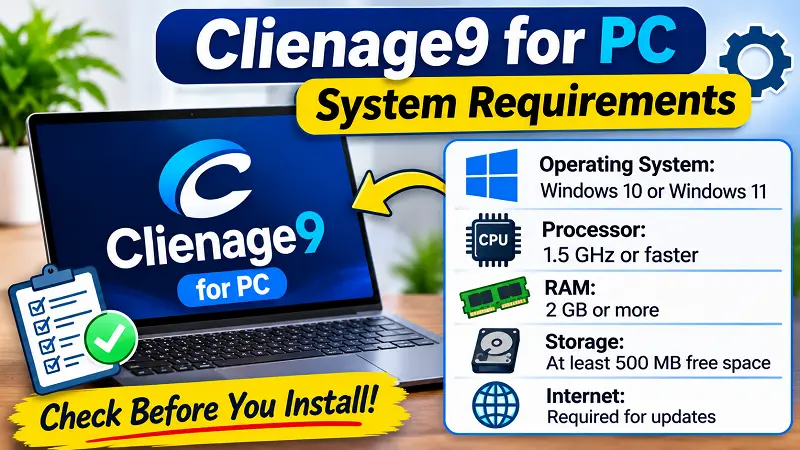
Before installing any desktop application, check whether your computer meets the developer’s official system requirements.
Some third-party pages mention the following specifications for Clienage9:
| Component | Specifications claimed online |
|---|---|
| Operating system | Windows 10 64-bit or Windows 11 |
| Processor | Intel Core i3 or AMD Ryzen 3 |
| RAM | 8 GB |
| Storage | Approximately 500 MB |
Important: These are unverified third-party claims, not confirmed official requirements.
Do not purchase hardware or change your computer configuration based on these specifications.
How to Check Your Windows Specifications
You can review your computer’s basic hardware information without installing additional software.
-
Open Windows Settings.
-
Select System.
-
Click About.
-
Review your processor and installed RAM.
-
Open File Explorer to check available storage.
For graphics information, open Task Manager and select the Performance tab.
These details help you understand your PC’s capabilities, but they cannot establish compatibility with an unverified application.
How to Download Clienage9 for PC Safely
If you are searching for a Clienage9 PC download, focus on verifying the source before downloading an executable file.
An unfamiliar installer can create unnecessary security risks, particularly when its publisher and purpose are unclear.
Follow these precautions.
Step 1: Identify the Developer
Look for an identifiable developer or software publisher.
Check whether the developer has a consistent website, contact information, product documentation, and a history of software releases.
Do not assume that a website offering a download is automatically operated by the software developer.
Step 2: Check the Download Source
Prefer a verified developer-controlled website or a recognized software distribution platform.
Be cautious of third-party download pages that use misleading download buttons, unexpected advertisements, or unrelated installation packages.
If you cannot establish where the file originated, do not download it.
Step 3: Verify the Installer
If you obtain an installer from a source you have independently verified, inspect its available publisher information.
On Windows:
-
Open your Downloads folder.
-
Right-click the installer.
-
Select Properties.
-
Check the Digital Signatures tab, if available.
-
Review the publisher information.
A valid digital signature helps identify the publisher and detect certain changes to a signed file. It does not guarantee that the application is harmless.
Step 4: Scan the Downloaded File
Windows Security includes Microsoft Defender Antivirus, which can scan downloaded files.
To perform a manual scan:
-
Open File Explorer.
-
Locate the downloaded file.
-
Right-click it.
-
Select the Microsoft Defender scanning option if available.
-
Review the scan result before proceeding.
A clean scan is a useful precaution, but it cannot guarantee complete safety.
Step 5: Install Only After Verification
Only proceed when you have established that the installer comes from a trustworthy source and that its purpose is clear.
Do not disable antivirus protection, bypass security warnings, or grant unnecessary administrator permissions just to complete an installation.
If the publisher remains unknown, leaving the file unopened is the safer decision.
Can Clienage9 Run on Windows 10 and Windows 11?
There is no independently confirmed compatibility documentation establishing official Windows 10 or Windows 11 support for a standalone Clienage9 application.
Some online guides mention both operating systems, but those claims should not be treated as verified requirements.
If you are accessing the Clienage9 website through a browser, the situation is different.
A modern browser can generally access ordinary websites on supported Windows systems without requiring a separate desktop installation.
For an actual downloadable application, wait until the developer provides clear operating-system requirements and a verifiable installation source.
Is Clienage9 for PC Safe?
The safety of Clienage9 depends partly on what you are accessing.
Reading publicly available website content through a modern, updated browser is different from installing an executable file from an unknown source.
The main concern is not the search keyword itself. It is the possibility of downloading software that has not been properly identified.
Consider these precautions:
-
Use the correct website address.
-
Avoid unfamiliar download mirrors.
-
Check the publisher before opening executable files.
-
Keep Windows Security enabled.
-
Never share passwords with an unverified application.
-
Avoid granting permissions that the software cannot reasonably explain.
Also remember that an application’s appearance does not establish its authenticity.
A professional-looking download page can still provide insufficient evidence about the software it distributes.
Common Mistakes to Avoid When Searching for Clienage9
Finding accurate information becomes easier when you recognize the difference between confirmed details and online claims.
Trusting the First Download Result
A high search ranking does not prove that a download is official.
Check the destination website, publisher information, and available documentation before taking action.
Assuming Every Download Is Official
Different websites may use the same software name without having any connection to its developer.
A matching filename is not proof of authenticity.
Relying on Unconfirmed Features
Claims about automatic FPS improvements, reduced latency, and real-time analytics should be supported by genuine product documentation or independent testing.
Avoid making purchasing or installation decisions based entirely on promotional descriptions.
Ignoring Windows Security Warnings
Security warnings should not be dismissed simply because an installer claims to improve gaming performance.
Investigate the warning and verify the file before deciding what to do.
Confusing Website Content With Downloadable Software
A gaming publication can provide articles, guides, and technical information without offering a standalone Windows application.
This distinction is particularly important when searching for Clienage9 for PC.
What Should You Do If You Cannot Find a Verified PC Download?
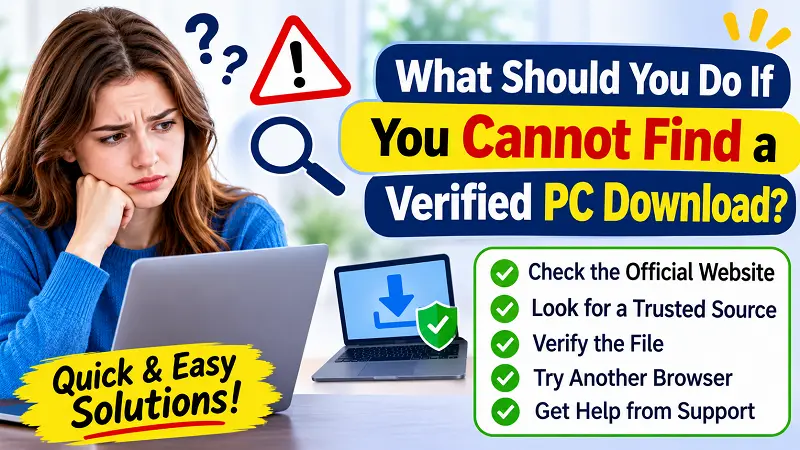
If you cannot find an official installer, there is no reason to keep downloading files from unrelated websites.
Instead, identify what you actually want to accomplish.
For example:
-
If you want gaming information, explore the available website articles.
-
If you want to monitor FPS, look for established hardware-monitoring tools.
-
If you want to troubleshoot lag, investigate your internet connection and game server.
-
If you want to optimize graphics, use the settings provided by your game and graphics-card manufacturer.
This approach helps you find a suitable solution without installing unidentified software.
Frequently Asked Questions About Clienage9 for PC
1. What is Clienage9 for PC?
Clienage9 is associated with a gaming information website covering strategies, gameplay, and gaming technology. However, its identity as a standalone downloadable Windows application has not been independently verified.
2. Can I download Clienage9 for Windows 10?
There is no confirmed official Windows installer or verified compatibility documentation. Avoid downloading executable files from unidentified websites.
3. Does Clienage9 support Windows 11?
Official Windows 11 support for a standalone application has not been established. Website content can be accessed through a compatible desktop browser.
4. Is Clienage9 free to use?
The website provides publicly accessible gaming information. However, there is no independently confirmed pricing structure for a standalone Clienage9 PC application.
5. Does Clienage9 improve FPS?
Some third-party articles claim that Clienage9 includes FPS optimization features. However, independent performance testing has not established that these features work or deliver specific improvements.
6. Is Clienage9 safe to install?
Its downloadable software safety cannot be established without a verified developer and installer. Check the publisher, download source, and Windows Security scan before opening any executable.
7. Can I use Clienage9 without installing software?
You can explore the publicly accessible website through a desktop browser. A separate application is not necessary for ordinary website browsing.
8. What should I do if a Clienage9 installer is not working?
First, establish whether the installer is authentic. Check its source and publisher information. Do not disable antivirus protection to force an installation. If the file cannot be verified, do not run it.
Conclusion
Clienage9 for PC is a search topic that requires some clarification before users attempt to download anything.
The name is associated with gaming-related website content and several third-party descriptions of desktop software. However, an independently verified Windows application, official installer, and confirmed system requirements have not been established.
The safest approach is to explore the available website content through a browser and verify any software download through reliable developer documentation.
Ultimately, knowing the difference between an online gaming resource and an installed PC application can save you time and help protect your computer from unnecessary security risks.